

Unlocking
The actual door opening happens in the Unloc app – not in DigitalKey. DigitalKey gets your keys ready, and Unloc uses them to open the door over Bluetooth.
How it fits together
Section titled “How it fits together”- Get your keys ready in DigitalKey. Open DigitalKey and make sure the key for the door you want to open shows Klar (grønn) (Ready (green)). See your keys if you’re unsure.
- Open the door in Unloc. Select the lock in the list and tap Bruk nøkkel (Use key). Unloc opens and connects to the lock over Bluetooth.
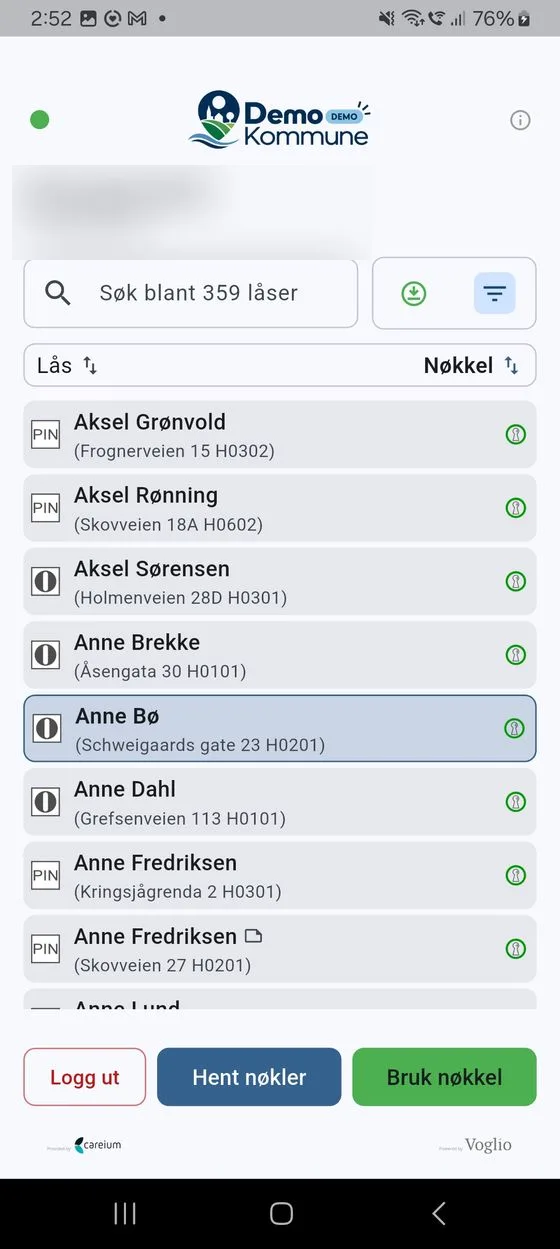
If you have a lock with a PIN-kode (PIN code), DigitalKey shows a code instead of opening Unloc. Enter the code on the lock to open it.
Opening without a connection
Section titled “Opening without a connection”If you downloaded your keys in advance, you can open doors even when your phone is offline (no connection). The keys must be made ready and downloaded while you have a connection. Read more under offline use.
When it doesn’t work
Section titled “When it doesn’t work”- «Kunne ikke åpne Unloc-appen. Sjekk at Unloc er installert.» (Could not open the Unloc app. Check that Unloc is installed.) – Unloc isn’t installed, or isn’t fully set up. Install Unloc (see getting started) and try again.
- The key isn’t Klar (grønn). – You can only use a key that is ready. Get the key ready in DigitalKey first.
- The door won’t open in Unloc. – Move right up to the door, check that Bluetooth is on, and try again. See troubleshooting if it still doesn’t work.